
Why Can’t I Use My Flashlight? Common Causes & Fixes 2026
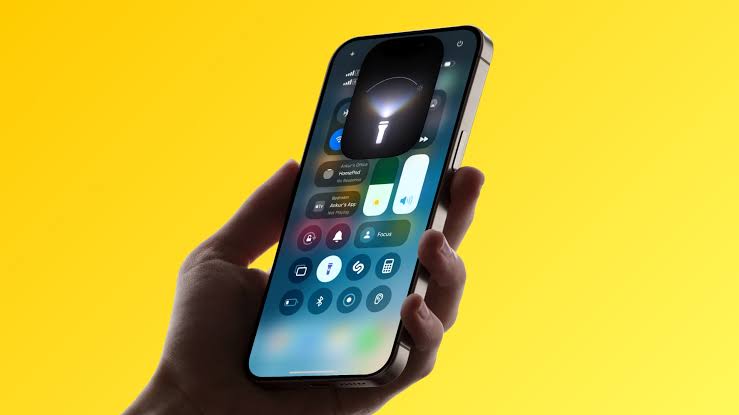
Why Can’t I Use My Flashlight? Your flashlight suddenly refuses to turn on, and it’s almost always at the worst possible moment. The good news is that this is rarely a serious hardware issue.
In most cases, a background app, a battery-saving mode, overheating, or a simple software glitch is blocking access.
Your flashlight usually won’t turn on because another app is using the camera, Low Power or Battery Saver mode is active, the phone is overheating, or the battery is critically low. Closing camera apps, disabling power-saving mode, or letting the phone cool down fixes most cases.
Why the Flashlight Won’t Turn On
Your phone’s flashlight and camera flash share the exact same LED hardware. Because of this, only one feature can control that LED at a time.
If any app is actively using your camera, the flashlight button gets automatically disabled. This is why the torch often fails right after using apps like Instagram, Snapchat, or the built-in camera.
Camera App or Camera-Based Apps Running
The most frequent cause is a camera app running in the background. Social apps with live camera filters can quietly keep the camera module active.
- Fully close the Camera app, not just minimize it.
- Force-close social apps like Snapchat, Instagram, or TikTok.
- Restart the phone if the camera won’t release control.
Low Power Mode or Battery Saver Is Active
Low Power Mode on iPhone and Battery Saver on Android limit background features to extend battery life. On some devices, this restricts flashlight brightness or blocks it completely.
Turning this mode off from Settings or Control Center usually restores flashlight access immediately.
Overheating Protection
Phones that get too hot from sunlight, gaming, or heavy charging automatically disable power-hungry features. The LED flash is one of the first things disabled to protect internal components.
Letting your phone rest in a shaded, cool area for a few minutes typically resolves this without any settings changes.
Critically Low Battery
When your battery drops below a critical threshold, some phones disable the flashlight to preserve power for calls and essential functions. This protects your remaining charge for emergencies.
Charging your device for just ten to fifteen minutes is often enough to bring the flashlight back online.
Missing Control Center or Quick Settings Shortcut
Sometimes the flashlight shortcut gets accidentally removed from the iPhone’s Control Center or the Android Quick Settings panel. This makes it look like the flashlight is broken when it’s simply hidden.
Re-adding the shortcut through your customization settings solves this in under a minute.
Software Glitch or App Cache Issues
Occasionally, cached data from the Camera app interferes with how the flashlight toggle responds. This is purely a software issue and not a sign of hardware damage.
Clearing the Camera app’s cache or restarting your phone usually clears the glitch.
Hardware or LED Damage
If your flashlight flickers, stays dim, or never turns on regardless of settings, hardware damage is more likely. Water exposure, drops, or a loose connector can affect the LED module.
Unlike software issues, hardware problems typically need professional repair rather than a settings fix.
How to Fix a Flashlight That Won’t Turn On
Work through these steps in order, since most people find a fix within the first few methods.
- Close the Camera app and any social apps using the camera.
- Turn off Low Power Mode or Battery Saver.
- Let your phone cool down if it feels warm.
- Charge your phone for at least ten minutes.
- Restart your device completely.
- Re-add the flashlight shortcut in Control Center or Quick Settings.
- Update your phone’s operating system.
- Reset network or system settings if the issue continues.
- Visit a repair center if none of the above works.
iPhone vs Android: Flashlight Behavior Compared
Both platforms share the same core hardware limitation, but the settings paths differ slightly.
| Feature | iPhone | Android |
|---|---|---|
| Flashlight toggle location | Control Center | Quick Settings panel |
| Power-saving conflict | Low Power Mode | Battery Saver mode |
| Brightness adjustment | Long-press flashlight icon | Tap “Flashlight” label in Quick Settings |
| Shared hardware with camera | Yes | Yes |
| Common software fix | Restart device | Clear Camera app cache |
When to Worry About Hardware Damage
Most flashlight problems resolve with a simple software fix. But a few signs point toward a genuine hardware issue that needs repair.
- The flashlight flickers or strobes unexpectedly.
- It stays extremely dim even at maximum brightness.
- The icon is permanently greyed out after trying every fix.
- Your phone has recent water exposure or physical damage.
If you notice any of these, a certified repair technician should inspect the camera and LED module directly.
Mistakes to Avoid
- Don’t factory reset your phone before backing up your data.
- Don’t assume a dim flashlight means the bulb needs replacing; the LED is built into the camera module, not a separate part.
- Don’t ignore repeated overheating, since it can shorten battery lifespan over time.
- Don’t keep force-closing apps repeatedly without restarting the device first.
Expert Tip
Restarting your phone resolves the majority of flashlight glitches because it fully releases the camera hardware. Try this simple step before attempting any deeper settings changes.
Frequently Asked Questions (FAQs)
Why can’t I use my flashlight on my iPhone?
The most common reasons are Low Power Mode, an open camera app, or overheating. Closing background apps and disabling Low Power Mode usually fixes it.
Why can’t I use my flashlight on Android?
Battery Saver mode, an active camera app, or a software glitch are the usual culprits. Restarting the device often resolves the issue quickly.
Why is my flashlight icon greyed out?
A greyed-out icon means the operating system can’t access the LED hardware. This typically happens when another app is using the camera or the phone is overheating.
Does using the camera app block the flashlight?
Yes, the flashlight and camera flash share the same LED. If the camera is actively open, the flashlight toggle gets disabled automatically.
Can low battery stop the flashlight from working?
Yes, many phones disable the flashlight below a critical battery level to save remaining power. Charging for ten to fifteen minutes usually fixes this.
Will restarting my phone fix the flashlight?
In many cases, yes. Restarting fully releases the camera hardware and clears minor software glitches affecting the flashlight.
Why does my flashlight turn off by itself?
This can happen due to overheating protection or a background app interrupting camera access. It’s rarely a sign of permanent damage.
Is a flickering flashlight a hardware problem?
Usually, yes. Flickering often points to a loose connector or LED damage rather than a software issue.
Can I replace just the flashlight bulb?
No, the LED is permanently built into the rear camera module. A malfunctioning LED typically requires replacing the entire camera unit.
Does overheating damage the flashlight permanently?
Occasional overheating protection is normal and not harmful. Frequent, prolonged overheating can shorten the lifespan of internal components over time.
Why did my flashlight shortcut disappear?
It may have been accidentally removed from Control Center or Quick Settings during a customization update. You can easily re-add it through your settings.
Can a software update fix flashlight issues?
Yes, outdated software sometimes causes conflicts with camera-related features. Updating to the latest OS version can resolve persistent glitches.
Why is my flashlight very dim?
Some phones let you adjust flashlight brightness through a slider. If it’s already at maximum, a dim light may indicate a failing LED or battery issue.
Should I factory reset my phone to fix the flashlight?
Only as a last resort after backing up your data. Most flashlight issues are resolved with simpler fixes like restarting or clearing cache.
When should I visit a repair shop for my flashlight?
Visit a repair center if the flashlight flickers, stays dim, or remains greyed out after trying every software fix. This usually indicates hardware damage.
Conclusion
In most cases, your flashlight stops working due to a simple software conflict, an active camera app, or a battery-saving mode. Working through the fixes above resolves the issue for the vast majority of users.
If the flashlight still won’t respond after a full restart and settings check, hardware damage becomes more likely. At that point, a certified repair technician can properly diagnose the camera module.